What Is CTI? How Phone Systems and CRMs Actually Connect
CTI is the layer joining a phone system to the software an agent works in. The network does not know whose number is calling; the CRM has no idea the phone is ringing. What crosses that gap, and the three things to check before blaming the line when a screen pop arrives late.

The agent picks up and the customer record is still blank. CTI is wired in, and this still happens — the cause is rarely the network.
1. CTI Translates Between the Phone Network and the Desktop
Computer Telephony Integration joins a phone system to the software an agent works in. The phone system — a PBX, or a cloud contact centre — knows which number called which and what state the call is in, but not whose number it is; the CRM knows that and has no idea the phone is ringing.
CTI carries the caller number (ANI) and dialled number (DNIS) across to the desktop, and turns a button press on screen into a command the network understands.
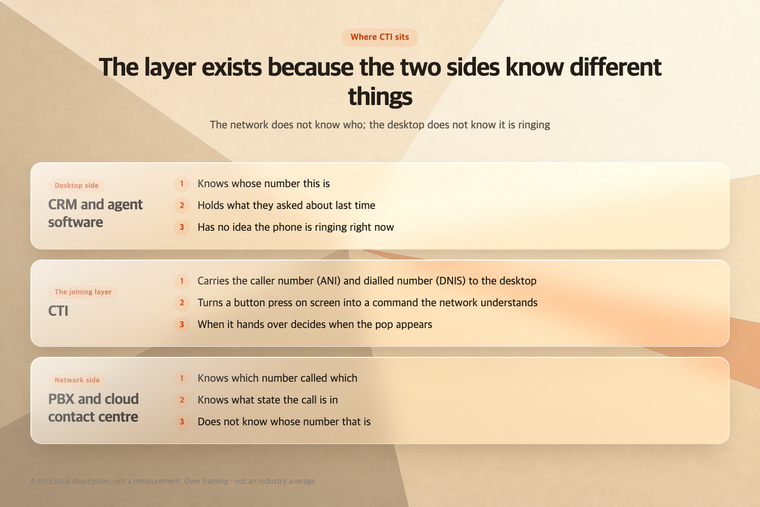
What each layer knows, and does not, is what sets the scope of an integration.
An IVR sits ahead of all this, on the network side. What to keep when that front end becomes AI is covered in What to Keep When You Replace an IVR With AI — that piece is about replacing the front end, this one about the wiring that stays either way.
2. Two Things Cross the Layer
The screen pop. The desktop looks up a record from data attached to the call. Genesys documents a fixed search order for its Gplus Adapter — keys prefixed id_ first, then cti_ keys, then a regular expression, then ANI and DNIS. Phone number is close to a last resort. (Genesys, Gplus Adapter Screen Pop, accessed 2026-08-07)
Call control. Answer, hold, transfer and hang up from the same window. Salesforce Open CTI does this as a browser JavaScript API, so a softphone runs inside Salesforce with no adapter per machine. (Salesforce, Get Started with Open CTI, accessed 2026-08-07)
Both methods have a lifespan. That same page states Open CTI is in maintenance mode, retiring in February 2028 and already unavailable in newly created Agentforce Service orgs, with Salesforce Voice as the successor. This layer hangs on two platform roadmaps at once, and a feature grid leaves that column out.
3. A Late Pop Is Usually Not a Network Problem
The screen fills in after the greeting. Agents stop waiting and search by hand mid-call, and the integration ends up alive but unused. Three checks, in order.
Trigger point. The Genesys page above states the default is to pop when the call is established; popping while it still rings requires Screen Pop on Ringing. Often the lookup is not slow, it starts late.
Lookup key. Country-code, leading-zero and switchboard formats sitting in one table is common, and a format the CRM does not store finds nothing.
Match count. When several records share a number the desktop has nothing to choose by — hence the companion troubleshooting page having you surface the match count in debug notifications. (Genesys, Troubleshooting Gplus Adapter Integration with Salesforce, accessed 2026-08-07)
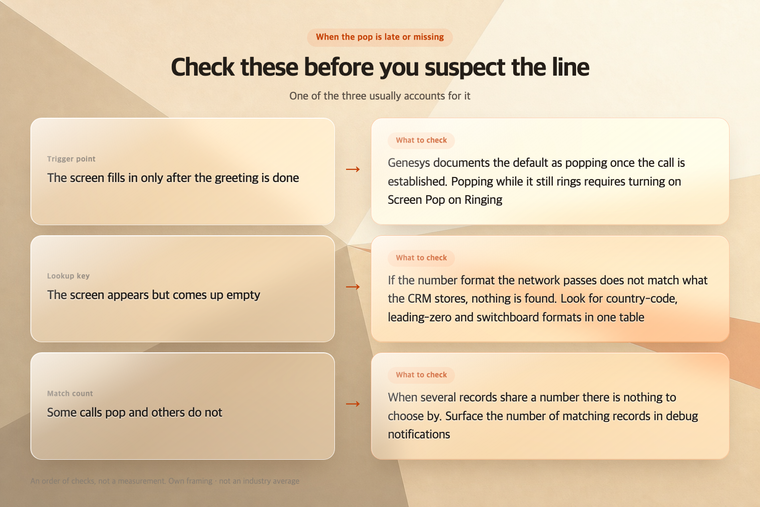
A delayed pop almost always traces back to one of these three, not to the line.
The layer is still needed when an AI answers. BringTalk measures call start and lookup completion as two separate numbers.
4. Where This Does Not Apply
Honestly, CTI is not always worth wiring.
- A few dozen calls a day and two or three agents. The seconds a pop saves need volume to add up
- Calls where the number identifies no one. Switchboard origination and shared lines break the premise
- A CRM nobody has cleaned up. A wrong record is worse than none, and an agent who stops trusting the screen is hard to win back
Outbound-led teams have a different bottleneck, the list and the dialling method, which is outside this piece.
In short: CTI moves what the network knows (ANI, DNIS, call state) and what the desktop knows (who this is) across to each other. When a pop is late, check the trigger point, the lookup key and the match count before the line.