Customer Memory for Voice AI Is an Operating Layer, Not a Memory Trick
Customer memory is not a feature for storing more customer data. For Voice AI, it must be a governed operating layer across consent, retention, agent review, and CRM evidence.


Twilio recently framed AI customer memory as a core layer of customer experience, while OpenAI highlighted how agents are moving toward longer units of work. In Voice AI, that shift is more sensitive than in text interfaces. The moment an agent remembers previous calls, preferences, and churn signals, response quality can improve — but so can privacy, misrecognition, and over-automation risk.
Customer Memory Is Not a Long-Term Storage Feature
Customer memory becomes risky when it is treated as “store more about the customer.” Voice AI speaks in real time, and customers often hear the answer as an official company response. That means memory must be designed around when it is used, when it expires, and who reviews it, not around how much can be stored.
Good memory does not remember more facts. It retrieves only the facts needed for the next interaction, inside a controlled boundary.
Twilio’s June 2026 article on AI customer memory describes how AI can use prior interactions and preferences to personalize customer experience. BringTalk’s view is that Voice AI teams should translate that idea into an operating model before they turn it into a feature.
In Voice AI, Boundaries Come Before Recall
A voice agent with customer memory must answer three questions before it speaks.
- Is this data allowed to be reused for this purpose?
- Does this fact improve the next customer interaction, or is it an inference?
- Can the AI say this directly, or should a human agent confirm it first?
Without those questions, memory becomes a black box that produces false confidence. For example, “You asked for a refund last time” is useful when true, but trust-breaking when it came from a transcription or matching error.
The Operating Loop: Capture → Filter → Context Pack → Audit
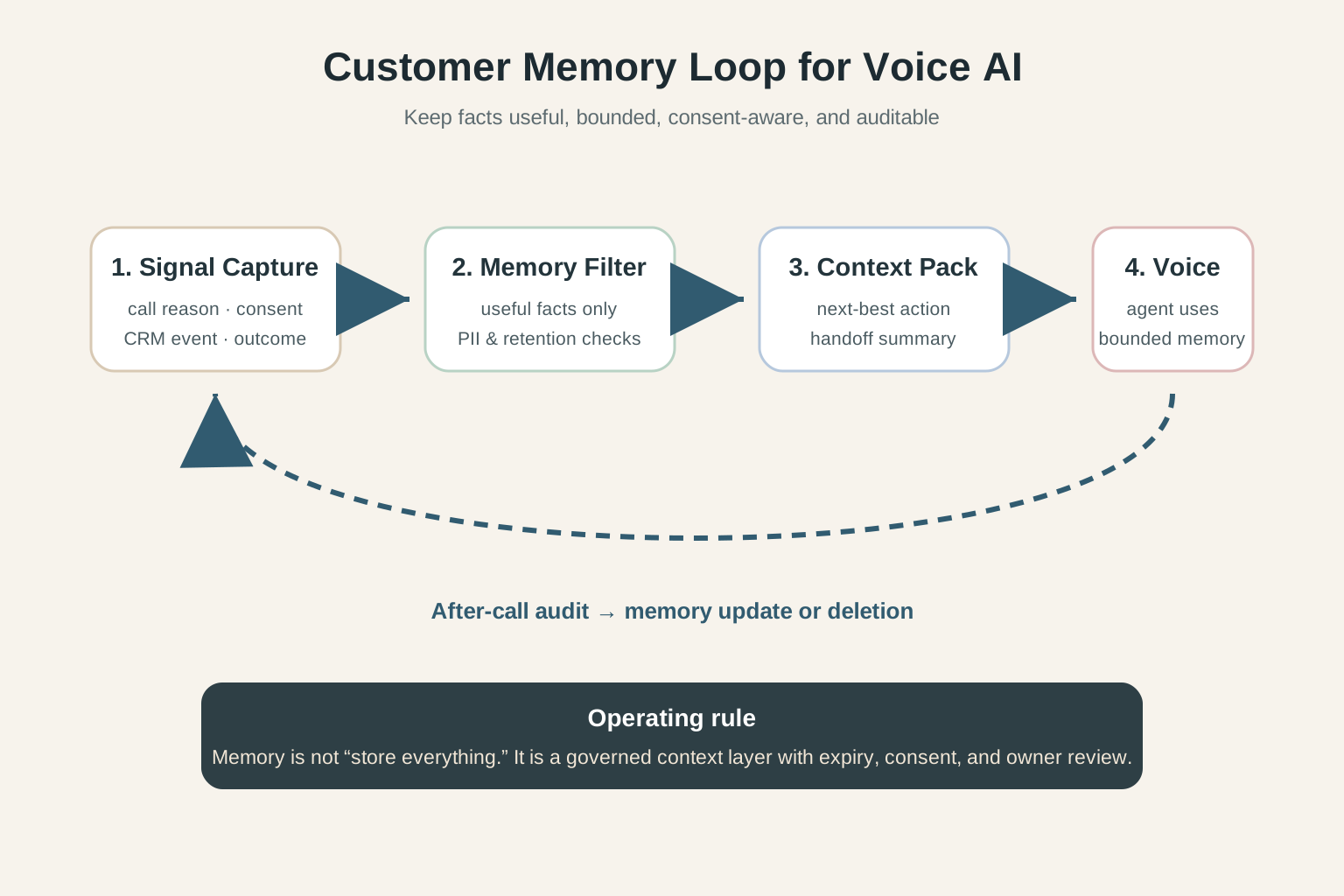
A safer Customer Memory layer for Voice AI follows a four-step loop.
1. Signal Capture
   - Capture call reason, consent, CRM event, and final outcome only

2. Memory Filter
   - Keep facts that help the next interaction
   - Exclude sensitive data, stale records, and unsupported inference

3. Context Pack
   - Give the AI a bounded summary, not the full customer history
   - Keep evidence ready for human handoff

4. After-call Audit
   - Review how the AI used memory
   - Correct or delete inaccurate memory
The goal is not to put memory “inside the model.” The goal is to create an operating layer that CRM, QA, and human agents can inspect.
Memory Matters Most in Lead Qualification and Follow-Up
Customer Memory becomes most tangible in two workflows. The first is lead qualification: deciding whether the customer has already shared product interest, budget range, location, available schedule, or buying intent. The second is follow-up automation: calling or messaging again with enough context that the customer does not have to repeat the same information.
Internally, teams may abbreviate these as LQA (Lead Qualification Automation) and FUA (Follow-Up Automation). In executive or customer-facing writing, however, the workflow should come first and the acronym second.
If a lead already shared product interest, preferred schedule, branch, budget range, or buying intent, asking everything again makes automation feel shallow. But if the agent asserts an unverified preference, sales quality drops. A practical memory policy separates three classes of information.
- Confirmed facts: date, product, location, contact window, requested follow-up
- Review-needed signals: intent level, dissatisfaction, budget signal, churn risk
- Prohibited memory: raw sensitive data, unsupported emotion inference, unapproved promises
With this structure, the agent does not need to say, “You were looking at an SUV last time.” It can say, “I see an earlier SUV inquiry. Would you like to continue from there?”
Five Policies to Set Before Implementation
Before adding customer memory to a Voice AI workflow, enterprise teams need a policy table, not just a feature list.
- Retention period: how long each memory type remains active
- Allowed purpose: re-engagement, handoff, QA, or all three
- Customer disclosure: how the call explains AI and data usage
- Correction path: how a customer or human agent fixes wrong memory
- Audit log: which memory caused which AI response
OpenAI’s June 2026 research on agents handling longer work points in the same direction. The more work an agent performs, the more context and memory become both a performance layer and a control surface.
BringTalk’s View: Memory Is Responsibility, Not Friendliness
When Voice AI remembers a customer, calls can become shorter and more relevant. But enterprise buyers should not ask only, “How much can the AI remember?” The better question is, “Who can explain and correct what the AI remembered?”
BringTalk treats Customer Memory as a context layer for better next interactions, but it should be designed with Zero Retention boundaries, human approval points, and CRM evidence. Under that model, memory becomes an operational asset rather than a risky personalization trick.
The goal of Customer Memory is not for AI to pretend it knows the customer. The goal is to prevent customers from repeating themselves while making every remembered fact correctable.